Understanding FlatBuffers in Java
FlatBuffers is an open-source, cross-platform serialization library originally created by Google for game development and performance-critical applications. Unlike JSON or Protocol Buffers, FlatBuffers allows you to access serialized data directly without parsing or unpacking it first into intermediate objects.
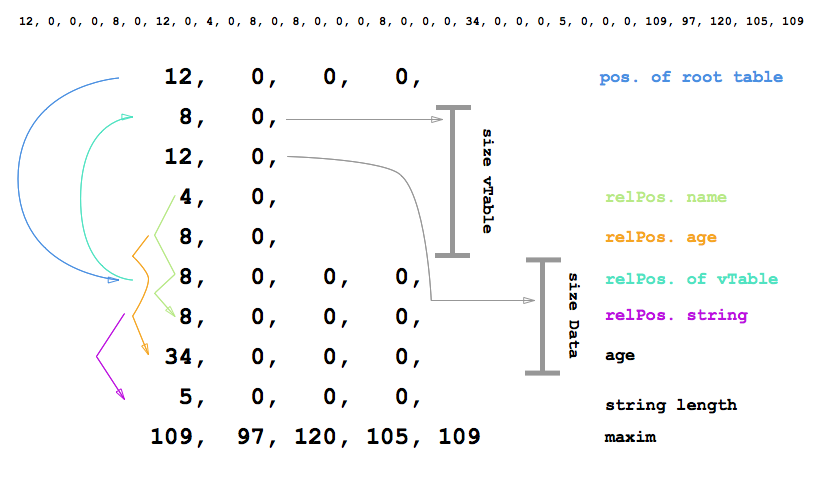
Why FlatBuffers?
- Zero-copy deserialization: You read data directly from the byte buffer. This skips memory allocation and parsing overhead.
- Memory efficient: Data is strictly structured and flat, meaning a very tiny memory footprint.
- Strongly typed: Errors are caught at compile-time rather than runtime.
- Language agnostic: Supported in Java, C++, Python, Go, and more.
1. Define Your Schema (.fbs)
Everything starts with a schema definition file. Let's define a simple Game.fbs representing a character and their weapon.
namespace MyGame;

table Weapon {
  name: string;
  damage: short;
}

table Player {
  hp: short = 100;
  mana: short = 50;
  name: string;
  weapon: Weapon;
}

root_type Player;
2. Compile the Schema
You use the FlatBuffers compiler (flatc) to generate Java classes from your schema.
flatc --java Game.fbsThis generates MyGame/Player.java and MyGame/Weapon.java which provide builder and accessor methods.
3. Serialization in Java
Here is how you build a FlatBuffer in memory.
import MyGame.*;
import com.google.flatbuffers.FlatBufferBuilder;
import java.nio.ByteBuffer;

public class Main {
    public static void main(String[] args) {
        // Initialize builder with an initial size
        FlatBufferBuilder builder = new FlatBufferBuilder(1024);

        // 1. Create strings/objects FIRST (bottom-up approach)
        int weaponName = builder.createString("Sword");
        int playerName = builder.createString("Hero");

        // 2. Build the Weapon
        Weapon.startWeapon(builder);
        Weapon.addName(builder, weaponName);
        Weapon.addDamage(builder, (short) 50);
        int sword = Weapon.endWeapon(builder);

        // 3. Build the Player
        Player.startPlayer(builder);
        Player.addName(builder, playerName);
        Player.addHp(builder, (short) 300);
        Player.addWeapon(builder, sword);
        int player = Player.endPlayer(builder);

        // 4. Finish the buffer
        builder.finish(player);

        // Extract the byte buffer
        ByteBuffer buf = builder.dataBuffer();

        System.out.println("Serialization complete!");
    }
}
4. Zero-Copy Deserialization
Reading data is practically instantaneous. You just wrap the bytes and access the properties directly.
// Assuming 'buf' is the ByteBuffer we just created (or loaded from network/disk)
Player incomingPlayer = Player.getRootAsPlayer(buf);

System.out.println("Player Name: " + incomingPlayer.name());
System.out.println("Player HP: " + incomingPlayer.hp());

Weapon incomingWeapon = incomingPlayer.weapon();
if (incomingWeapon != null) {
    System.out.println("Weapon: " + incomingWeapon.name() + " (Damage: " + incomingWeapon.damage() + ")");
}
Notice that we didn't call any parsing functions like JSON.parse(). The accessor methods calculate offsets and jump directly to the exact memory address where the value is stored. This makes FlatBuffers exceptionally powerful for latency-sensitive applications like games or high-throughput microservices.