If you've ever written code to call a payment API, then wrapped it in a try/catch, then added a retry loop, then built a database table just to remember "did this step already run" — you've already felt the exact pain Temporal exists to solve. Temporal.io is an open-source platform that lets you write ordinary-looking code and get crash-proof, long-running reliability for free. Here's what that actually means, explained without the jargon.
The Problem Temporal Solves
Imagine an e-commerce order: charge the card, reserve inventory, notify the warehouse, send a confirmation email. Four steps, seemingly simple. Now ask: what happens if your server crashes right after charging the card but before reserving inventory? In a normal application, you'd need to build your own solution — a status column in a database, a cron job that checks for stuck orders, retry logic at every single step, and careful bookkeeping so you never double-charge a customer. Multiply that by every workflow in your product, and you're spending more time on plumbing than on the feature itself.
Temporal's answer is a concept called Durable Execution: once your process starts, Temporal guarantees it runs to completion, whether that takes two seconds or two years, even if the server running it crashes midway.
The Two Building Blocks: Workflows and Activities
Temporal applications are built from just two core ideas, and understanding this split unlocks almost everything else.
A Workflow is your business logic — the sequence of steps, written as normal code with regular loops, if-statements, and function calls. Booking a flight, onboarding an employee, transferring money between accounts: these are all Workflows, just usually invisible ones baked into apps you already use. The one rule is that Workflow code must be deterministic, meaning if you re-run it with the same history, it always takes the same path. That's because Temporal literally re-runs your Workflow code to rebuild its state after a crash — more on that below.
An Activity is where the messy real world lives — calling a payment gateway, writing to a database, sending an email, hitting a flaky third-party API. Activities are ordinary functions that Temporal automatically retries with backoff if they fail, and reschedules if the machine running them dies. The mental model: Workflows decide what should happen and in what order; Activities are the ones who go do it.
How It Survives a Crash (Without Magic)
This is the part that feels like magic until you see the mechanism. Temporal keeps an Event History — an append-only log of every meaningful thing that happened in your Workflow: which Activity started, what it returned, which timer fired. When your Workflow calls an Activity or starts a timer, that request is recorded as an event before anything happens.
If the Worker process running your code crashes, a new Worker simply fetches that Event History and replays your Workflow code from the top against it. Because the code is deterministic, it takes the exact same branches it took before, arrives back at precisely the point it crashed, and continues from there — with local variables and progress fully intact. Nothing was restored from a memory snapshot; the code essentially "remembers" its own past by re-living it against the recorded facts. It's less like a save file and more like reading a transcript of a conversation to pick up exactly where it left off.
The Moving Parts, In Plain Terms
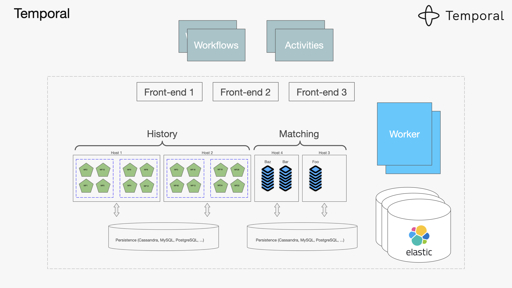
A working Temporal setup has a few named pieces, and each one maps to something concrete:
- Temporal Service: the backend brain that stores the Event History and coordinates everything. You can self-host it or use the managed Temporal Cloud.
- Worker: a process you run, on your own infrastructure, containing your actual Workflow and Activity code. Temporal's service never sees or executes your code directly — your Worker does, which also means your data never has to leave your network.
- Task Queue: the queue a Worker polls for work. Workers pull tasks rather than having them pushed, so a busy or offline Worker simply stops asking for more until it's ready.
- Temporal Client: the object your application uses to actually start a Workflow, send it live updates (called Signals), or ask it questions while it's running (called Queries).
Why Developers Actually Like Using It
A few capabilities show up again and again in real teams' reasons for adopting Temporal:
- No custom retry logic. Failed Activities retry automatically based on a policy you configure, not code you have to write and maintain at every call site.
- Workflows can run for a very long time. Waiting three days for a human to approve something, or a year for a subscription to renew, is just a durable timer — no cron jobs required.
- Full visibility into what happened. The Temporal Web UI lets you inspect any Workflow's entire history, see exactly which Activity failed and why, and debug from evidence instead of guesswork.
- You keep your own language and tools. Temporal isn't a no-code platform — you write real code in Go, Java, Python, TypeScript, .NET, PHP, Ruby, or Rust, in your own editor and version control.
- It fits into what you already run. Temporal deploys gradually into an existing monolith or microservices setup; you don't need to rebuild your architecture to start using it.
Your First Five Minutes With Temporal
The fastest way to feel this rather than just read about it: run temporal server start-dev from the Temporal CLI. It spins up a complete local Temporal Service and Web UI on your laptop in under two seconds, no infrastructure setup required. From there, pick an SDK in your preferred language, write one Workflow function with two or three Activity calls, and start it from a small Client script. Open the Web UI, watch the Workflow execute step by step, and then — for the fun part — kill the Worker process mid-run and restart it. Watch it pick up exactly where it left off. That one demonstration is usually what makes Durable Execution click.
Where People Use It in Practice
Temporal shows up anywhere a process has multiple steps and any one of them might fail, take a while, or need a human in the loop: moving money between bank accounts, provisioning cloud infrastructure, running background checks, orchestrating AI agent pipelines that call tools and wait on approvals, and coordinating long-running data pipelines that need to survive deploys and machine failures without a hand-rolled checkpoint table. If you've ever thought "this workflow is simple in theory but a nightmare to make reliable," that's usually a Temporal-shaped problem.